Sunday, September 30, 2012

ASCOOS Web Server (AWS) V1.3.15

The AWS is a special version of web server for all Web Developers and Web Designers and is based on Apache, Perl, multiple versions of PHP and MySQL, PostgreSQL, Filezilla, phMyAdmin, phpPgAdmin, eXtplorer.... etc... Installation in C:\

Features 

  • ASCOOS Web Server GUI Control 1.3.15
  • ASCOOS Web Server - Web Control Information (WCI) 0.1 beta5
  • Multilanguage, Skins
  • Apache 2.2.22
  • OpenSSL 1.0.1c
  • Filezilla FTP Server 0.9.41
  • Three (3) PHP Versions (5.2.17 - 5.3.17 - 5.4.7)
  • IonCube PHP encoder loaders 4.2.2 for PHP 5.2 - 5.3 - 5.4
  • Perl 5.16.1
  • Cache Accelerators: APC, eAccelerator, MemCache
  • Three (3) MySQL Database versions (5.1.66 - 5.5.28 - 5.6.7-rc)
  • PostgreSQL Database 9.1.6
  • MongoDB Database 2.0.7
  • Multiple SQLite Versions (2 and 3)
  • phpMyAdmin 3.5.2.2 - Web Interface for MySQL
  • phpPgAdmin 5.0.4 - Web Interface for PostgreSQL
  • rockMongo 1.1.0 - Web Interface for MongoDB
  • eXtplorer 2.1.0 RC5 - Web File Manager
  • browscap.ini version 5015
Updated to ASCOOS WEB SERVER 1.3.15 on 30/09/2012
Download ASCOOS WEB SERVER 1.3.15 (249.4 MB)
Download other versions from here

Source -
http://sourceforge.net/projects/awserver/

Visit website -
http://aws.ascoos.com/

Previous post regarding ASCOOS -
http://santoshdudhade.blogspot.in/2012/08/ascoos-web-server-aws-version-1313.html
http://santoshdudhade.blogspot.in/2012/08/ascoos-web-server-aws-v1311.html
http://santoshdudhade.blogspot.in/2012/06/ascoos-web-server-aws.html

Screenshot -


Quadodo Login Script - PHP Login Script

The Quadodo Login Script is a free open-source php login script written in PHP and SQL. It is a stand-alone system and is one of a kind. This free login script is for anyone who wishes to allow users to sign up for their site. It comes with loads of features that include:
  • Cookies or Sessions
  • In-Depth Administration Panel
  • MySQL or PostgreSQL
  • Permission Masks
  • Grouping System
  • Paging System
  • Block Access to Public
  • Easily Integrated
  • Muliple Languages
  • Many More...
Download -
Quadodo Login Script Version: 3.1.9
Documentation: ChangeLogUser GuideLicenseAbout
Released: March 11th, 2008
Full Downloads: qls-3.1.9.zipqls-3.1.9.tar.bz2qls-3.1.9.tar.gz
Changed Files Only: qls-3.1.9-cha...only.zipqls-3.1.9-cha...only.tar.bz2qls-3.1.9-cha...only.tar.gz


Source -
http://sourceforge.net/projects/qls/

Visit Website -
http://www.quadodo.net/

Screenshot -

Friday, September 28, 2012

mitmproxy - an SSL-capable man-in-the-middle proxy

mitmproxy is an SSL-capable man-in-the-middle proxy for HTTP. It provides a console interface that allows traffic flows to be inspected and edited on the fly.

mitmdump is the command-line version of mitmproxy, with the same functionality but without the user interface. Think tcpdump for HTTP.

  • Features 
  • Intercept HTTP requests and responses and modify them on the fly. 
  • Save complete HTTP conversations for later replay and analysis. 
  • Replay the client-side of an HTTP conversations. 
  • Replay HTTP responses of a previously recorded server. 
  • Reverse proxy mode to forward traffic to a specified server. 
  • Make scripted changes to HTTP traffic using Python. 
  • SSL certificates for interception are generated on the fly.
Install

The easiest way to install the latest release of mitmproxy is to use pip: pip install mitmproxy

For further instructions, see the Installation section of the documentation.

Download
Requirements
  • Python 2.6.x or 2.7.x. 
  • PyOpenSSL 0.12 or newer. 
  • pyasn1 0.1.2 or newer. 
  • urwid version 0.9.8 or newer. 
  • PIL version 1.1 or newer. 
  • lxml version 2.3 or newer.
  • The following auxiliary components may be needed if you plan to hack on mitmproxy: 
  • The test suite uses the pry unit testing library. 
  • Rendering the documentation requires countershape
  • mitmproxy is tested and developed on OSX, Linux and OpenBSD. Windows is not supported at the moment. 
  • You should also make sure that your console environment is set up with the following: 
  • EDITOR environment variable to determine the external editor. 
  • PAGER environment variable to determine the external pager. 
  • Appropriate entries in your mailcap files to determine external viewers for request and response contents. 
Source -
http://mitmproxy.org/index.html
Screenshot -

Lynis - Security and system auditing tool

Lynis is an auditing tool for Unix (specialists). It scans the system and available software, to detect security issues. Beside security related information it will also scan for general system information, installed packages and configuration mistakes.

This software aims in assisting automated auditing, software patch management, vulnerability and malware scanning of Unix based systems. It can be run without prior installation, so inclusion on read only storage is no problem (USB stick, cd/dvd).

Lynis assists auditors in performing Basel II, GLBA, HIPAA, PCI DSS and SOX (Sarbanes-Oxley) compliance audits.

Intended audience:
Security specialists, penetration testers, system auditors, system/network managers.

Examples of audit tests:
- Available authentication methods
- Expired SSL certificates
- Outdated software
- User accounts without password
- Incorrect file permissions
- Firewall auditing


System requirements:

- Compatible operating system (see 'Supported operating systems')
- Default shell
Supported operating systems
Tested on:
- Arch Linux
- CentOS
- Debian
- Fedora Core 4 and higher
- FreeBSD
- Gentoo
- Knoppix
- Mac OS X
- Mandriva 2007
- OpenBSD 4.x
- OpenSolaris
- OpenSuSE
- PcBSD
- PCLinuxOS
- Red Hat, RHEL 5.x
- Slackware 12.1
- Solaris 10
- Ubuntu
Downloads

1.3.0 - Latest release
1.2.9 - Previous release

Packages

Lynis RPM (spec)
Non-official RPM's (by Peter Linnell) 
Debian package
Lynis Demo


Documentation


Source -

http://www.rootkit.nl/projects/lynis.html

Screenshot -


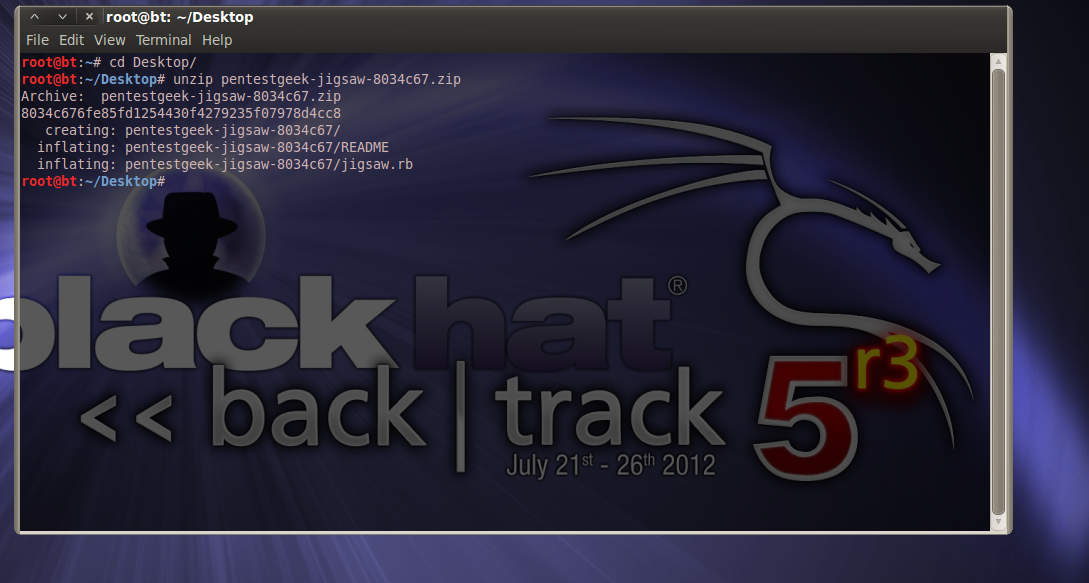
Jigsaw - Information Gathering Tool

Jigsaw.rb is a simple ruby script for enumerating information about a company's employees.
It is useful for Social Engineering or Email Phishing

#############
Collaborative project between Royce Davis (R3dy) and humble-desser 
Contact: royce.e.davis@gmail.com
#############3

Help:
$ ./jigsaw -h
Jigsaw 1.0 ( http://www.pentestgeek.com/ - http://hdesser.wordpress.com/ )
Usage: jigsaw [options]

 example: jigsaw -s Google

    -i, --id [Jigsaw Company ID]     The Jigsaw ID to use to pull records
    -s, --search [Company Name]      Name of organization to search for
    -r, --report [Output Filename]   Name to use for report EXAMPLE: '-r google' will generate 'google.csv'
    -v, --verbose                    Enables verbose output

Examples:
$ ./jigsaw -s Google
Your search returned more then one company
Jigsaw ID: 215043 - Google, Inc. 6,627 employees.
Jigsaw ID: 224667 - Google Postini Services 149 employees.
Jigsaw ID: 439035 - AdMob Google Inc 2 employees.
Jigsaw ID: 5032028 - Google Inc 1 employees.
...

$ ./jigsaw -i 215043 |grep -i market |grep -i manager
Fyall, Mike - Product Marketing Manager
Ramaswamy, Jenny - Marketing Manager
Satyasai, Serena - Product Marketing Manager
Fu, John - Product Marketing Manager
Shah, Davang - Group Marketing Manager-US Large Advertiser Marketing


Download -
jigsaw.rb
README

Source -
https://github.com/pentestgeek/jigsaw

Thursday, September 27, 2012

Goohost - Simple shell script extracts hosts/subdomains, ip or emails for a specific domain with Google search

Goohost is a simple shell script written by Watakushi that extracts hosts/subdomains, ip or emails for a specific domain with Google search.

Installation

First create a directory for the installation
$ mkdir -p /pentest/enumeration/google/goohost/
Then download the tool and make it executable:
$ cd /pentest/enumeration/google/goohost/
$ wget http://dl.dropbox.com/u/10761700/goohost.sh
$ chmod +x goohost.sh

Usage

Syntax

$ ./goohost.sh -t domain.tld [-m <host|ip|mail> -p <1-20> -v]

Options

-t <domain>
target domain. E.g. backtrack.linux.org
-m <method>
method: <ip|host|mail>
Default value is set to host
  • host: raw google hosts and subdomains search
  • ip: raw google hosts and subdomains search and performs a reverse DNS resolution
  • mail: raw google email search
-p <num>
Max number of pages (1-20) to download from Google.
Default 5
-v
verbosity.
Default is set to off

Example

Method: IP (-m ip)

$ ./goohost.sh -m ip -t aldeid.com
Results saved in file report-27526-aldeid.com.txt 
$ cat report-27526-aldeid.com.txt
www.aldeid.com 80.14.163.161

Method: Host (-m host)

$ ./goohost.sh -m host -t aldeid.com
Results saved in file report-29958-aldeid.com.txt 
1 results found! 
$ cat report-29958-aldeid.com.txt
www.aldeid.com

Method: Mail (-m mail)

$ ./goohost.sh -m mail -t aldeid.com
Results saved in file report-14152-aldeid.com.txt 
0 results found!
Source -
http://www.aldeid.com/wiki/Goohost


Wednesday, September 26, 2012

Ra2-dom-xss-scanner - Blackbox DOM XSS Scanner

Ra.2 - Blackbox DOM-based XSS Scanner is our approach towards finding a solution to the problem of detecting DOM-based Cross-Site Scripting vulnerabilities in Web-Application automatically, effectively and fast.

Ra.2 is basically a lighweight Mozilla Firefox Add-on that uses a very simple yet effective and unique approach to detect most DOM-based XSS vulnerabilities, if not all.

Being a browser-add on its a session-aware tool which can scan a web-application that requires authentication, although the user needs to manually needs to authenticate into the application, prior to scanning. Ra.2 uses custom collected list of XSS vectors which has been heavily modified to be compatible with its scanning technology. The add-on also implements basic browser intrumentation to simulate a human interaction to trigger some hard to detect DOM-based XSS conditions.


Features - 
False positive free by design: Vulnerable URLs are saved in DB, if and only if, our payload is executed successfully by the browser. Hence marked exploitable. If isn't false-positive, it's a bug! Report us :-)
Large collection of injection vectors, includes “modified” R’Snake’s vectors as well.
Supports transforming Unicode characters for testing content aware application.
Automatically handles JavaScript obfuscation/compression, as it relies on native interpreter.
Fast and light-weight.
Pretty easy learning curve. Point-n-Click.
Basic browser automation support: Simulates some of the browser events that require human interaction to trigger the XSS condition. Example:
<a href="javascript:alert(/XSS/)>Click here</a>
 type="button" value="Continue" onclick="javascript:alert(/XSS/) />
and similar scenarios.
Centralized reporting: Suitable for enterprise standard multi-user environment.

Installation :

1. Download the "ra.two.xpi" file and install it within Mozilla Firefox. We have tested it to be working fine on Mozilla Firefox Version 3.6.0 running on Windows 7 64bit. Your mileage may vary.

2. Download the archive "vectors.zip". Extract the contents ("xss.txt") to a folder. Rename the folder "xss" and copy it to the root of "C:". The resulting path should be "C:\xss\xss.txt".

3. Download the archive "reporting-tool.zip". Extract the contents to the webroot of your Apache server. We have tested it using the XAMPP package (http://www.apachefriends.org/en/xampp.html). In our case the path is "C:\xampp\htdocs\xss\"

4. Finally import the database schema to the MySQL via phpMyAdmin, required for the reporting tool.

5. The tool should be ready to use. If you find anything not working or buggy, please email us or raise a ticket at http://code.google.com/p/ra2-dom-xss-scanner/issues/list


Download -
ra2-osx-mLion.zip - [MacOS X] Ra.2 DOM XSS Scanner - Mozilla Add-On Source & Installer
Download other version s-

Source -


HTTP Anti Flood/DoS Security Module v.1.8.1 - Detect Flooder IPs, Reduce Attack Surface against HTTP Flood Attacks

This module provides attack surface reduction enhancements against the HTTP Flood Attacks at the web application level. Massive crawling/scanning tools, HTTP Flood tools can be detected and blocked by this module via htaccess, firewall or iptables, etc. (like mod_evasive)

You can use this module by including "iosec.php" to any PHP file which wants to be protected.


Features
  • This is a unique project and it is the world's first web application flood guard script.
  • At web application (scripting) level you can,
  • - Block proxies. (only via HTTP header)
  • - Detect flooding IP addresses.
  • - Slow down or restrict access for automated tools (HTTP flood, brute force tools, vulnerability scanners, etc.)
  • - Save your server & backend infrastructure resources (database, cpu, ram, etc.) under an attack.
  • - Restrict access permanently or temporarily for listed IP addresses in "banlist" file.
  • - Notify yourself via email alerts when attacks begin.
  • - Implicit deny for DoS/DDoS attacks
You can test module here: http://www.iosec.org/test.php (demo)

Watch the Proof of Concept video: http://youtu.be/LzLY_SKLq9w

Wordpress Plugin Page http://wordpress.org/extend/plugins/iosec-anti-flood-security-gateway-module

CHANGES v.1.8.1
- Improved Implicit Deny Mode for Banned IP(s) (without detection)
- Iptables Auto Ban Bash Script Included
- Request Cache Size Option
- Connection Limit Support
- Whitelist Support
- Reverse Proxy Support
- reCAPTCHA Support 

You can use IOSEC under .NET see. http://phalanger.codeplex.com/


Download iosec.http.anti.flood.v.1.8.1_with_iptables_bash_script.zip (201.4 kB)
Download other versions -
http://sourceforge.net/projects/iosec/files/

Source -
http://sourceforge.net/projects/iosec/

Previous post regarding IOSEC -
http://santoshdudhade.blogspot.in/2012/07/http-anti-flooddos-security-module.html
http://santoshdudhade.blogspot.in/2012/09/http-anti-flooddos-security-module-v17.html

katana Version 3.0 Beta released

Katana packages security / ethical hacking distributions (like Backtrack, Ophcrack, & UBCD) together with portable Windows applications (like Metasploit, NMAP, Cain & Able, & Wireshark) to run off a single USB flash drive.
Features :
  •     100s of security / ethical hacking tools
  •     Boot from multiple Live distributions
  •     Run hundres of portable Windows security application from a single flash drive
  •     Add additional distributions and portable application

Katana Bootable:

Backtrack 
the Ultimate Boot CD 
CAINE 
Ultimate Boot CD for Windows 
Ophcrack Live 
Puppy Linux 
Trinity Rescue Kit 
Clonezilla 
Derik's Boot and Nuke 
Kon-Boot (See boot fix here

And instructions on installing additional Distributions can be found here

Katana Tool Kit:
- Metasploit 
- Wireshark 
- NMAP 
- John the Ripper 
- Cain & Abel 
- Firefox 
- PuTTY 
- the Unstoppable Copier 
- OllyDBG 
- Cygwin 
- ClamAV 
- IECookiesView 
- MozillaCacheView 
- FreeOTFE 
- FindSSN 
- The Sleuth Kit 
- OpenOffice 
and many more.

Installation:

  Requires USB flash drive (or other disk) of size 8GB or larger formatted FAT32.

  NOTE: Some tools included in Katana get flagged as "hacker tools" by many
  Anti-Virus programs. Make sure to turn off all virus scanner before install.

  1. Copy the katana-v3.0-beta-1.zip and katana-v3.0-beta-2.zip files to the local
  disk.

  2. Extract the content of the Katana ZIP files onto the USB flash drive;
  example "E:\" for Windows OR "/mount/sdb1" for Linux. Make sure NOT to create a
  subdirectory when extracting the ZIPs content.  Extract all files into the root
  of the flash drive. If prompted, use the "write into" option to copy
  files into already existing directories. Katana is broken into 2 files because
  of its size. Extract both files to the directory in the same manner. There are
  many files, so this may take some time.  When done, you should see about a dozen
  files in the root of the flash drive.

  3. Change directory to the freshly copied "boot" directory on the USB device.
  (Make sure you're in the "boot" directory on the USB device and NOT your local
  disk! )

  4. Run the following with Administrative privileges. For Linux/OSX run
  ./boostinst.sh, for Windows run ./boostinst.bat

  5. Make sure the computer BIOS allows USB boot. Boot from flash drive. All Done! .

Version 3.0 Beta
- DefCon 20 exclusive release through Hackers For Charity 
- Split up into 2 archived files

Download Version :
katana-v3.0-beta-2.zip (2.5 GB)
katana-v3.0-beta-1.zip (3.6 GB) 
MD5Sum:
katana-v3.0-beta-1.zip    0752763067e5c1eba3707c5356ccd567
katana-v3.0-beta-2.zip    ebc0c0279a0b4095f28dfd4121cebf40
Download other  version 

Previous post regarding katana -